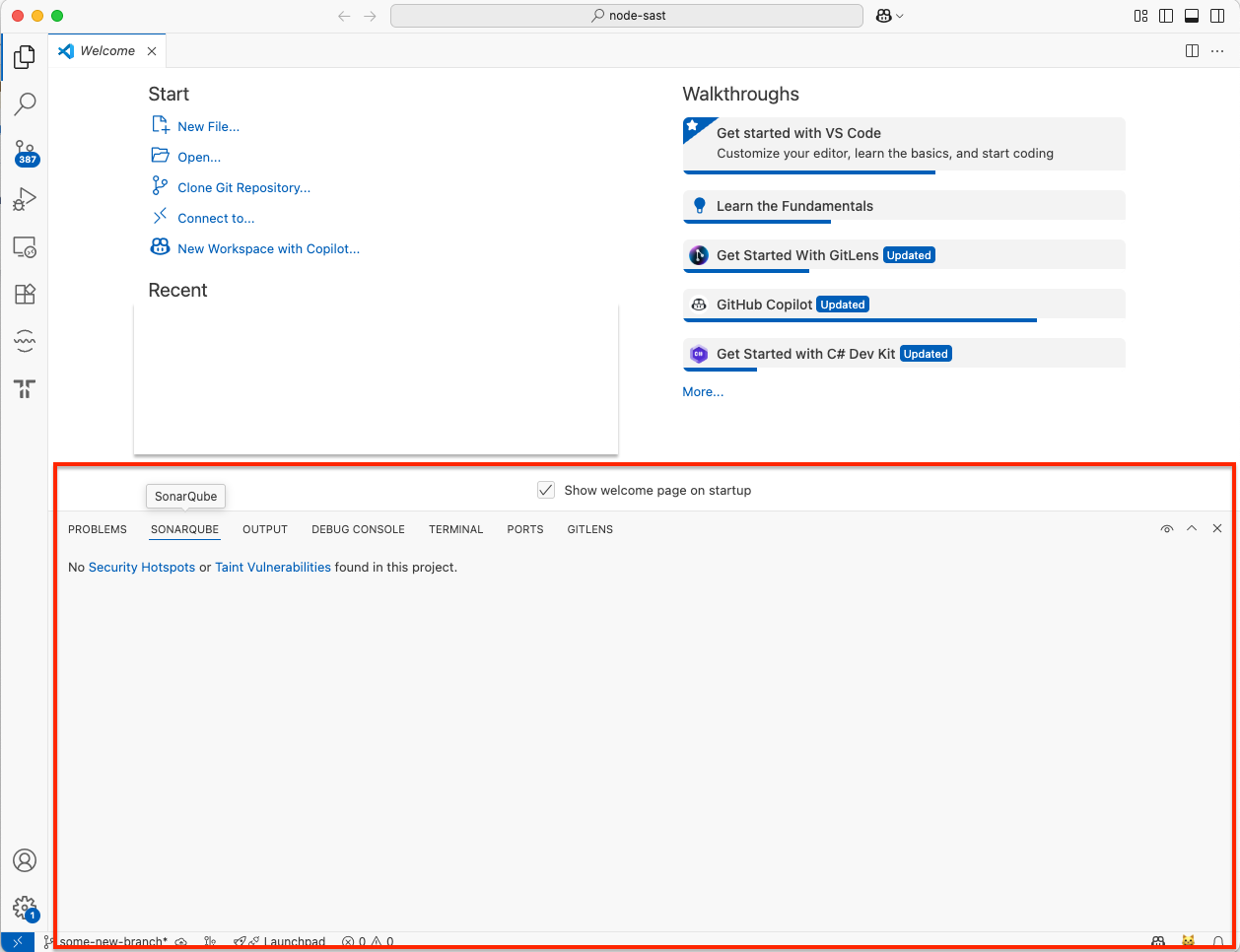
What's the new view?

  • Operating system: Windows 11
  • SonarQube for VS Code plugin version: 4.26
  • Programming language you’re coding in: Not applicable
  • Is connected mode used:
    • SonarQube Cloud, SonarQube Server, or SonarQube Community Build? (if one of the latter two, which version?): SonarQube Community Build v25.7.0.110598
  • And a thorough description of the problem / question:

Latest Release notes says:

Move Taint Vulnerabilities and Security Hotspots to a new, SonarQube view

What is that “new SonarQube view”?

I’ve checked Community Build v25.7.0.110598 - MQR Mode, but I couldn’t find that “new view”

1 Like

Hi there @gian1200,

Thanks for being an early adopter :smiley:

If your workspace folder is bound to a SonarQube Server project, you will see a new view container appear next to the PROBLEMS view in the bottom panel.

Security Hotspots and Taint Vulnerabilities will now be published in this view. Before, Security Hotspots had a dedicated view in the side panel, and Taint Vulnerabilities were being published in the native PROBLEMS view.

We would be happy to hear your feedback on these changes (there’s more to come soon :slight_smile: )

All the best,
Sophio

1 Like