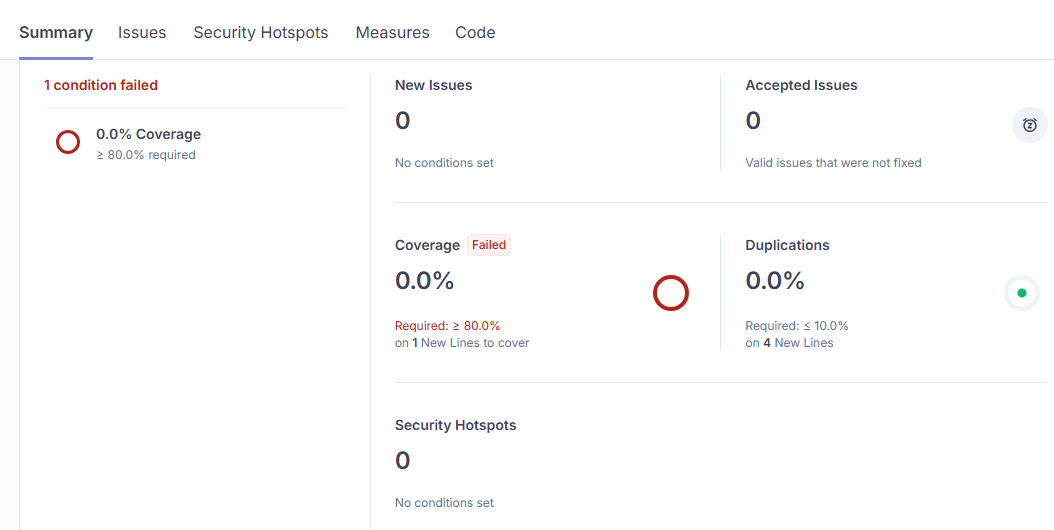
We use SonarQube Developer Edition v2025.1 and have configured the analyzes to compare branches with master to find what is new code.
But sometimes the QualityGate is green, even though we dont’t have sufficent code coverage. This screen-shot shows an example with one line of code changed in the branch with 0% coverage and still green QualityGate.
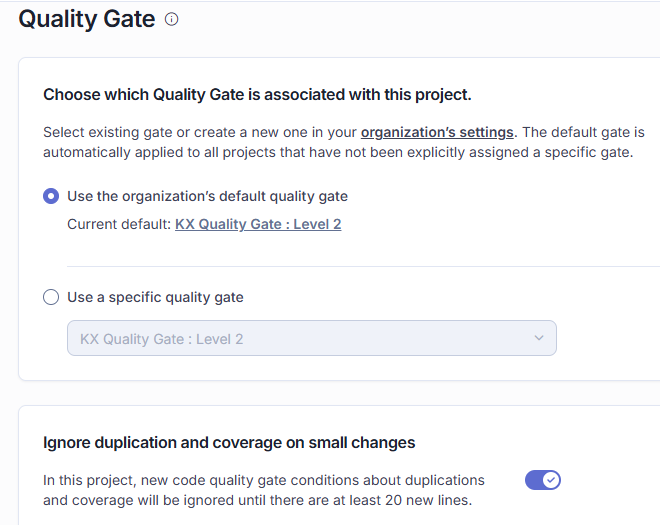
Thanks for the screenshot! It makes it easy to see that you’ve fallen afoul of what I call the “fudge factor”. By default, conditions on coverage and duplications don’t kick in when there are fewer than 20 new lines. This can turned off at the global or project level under General Settings → Quality Gate.
Thank you for quick reply. You was right about that the switch for ignoring coverage and duplication in small changes was enabled.
I got two follow-up questions.
The branch was not having failed QualityGate with this small change, but when it was merged to master the QualityGate failed. Master have defined that new code is compared to previous version. And because each succesfull build leads to a release, the previous commit was a change of version. so should only be 1 line of code changed on master too.
Is it possible to define this setting on a per project basis. For most teams, disabling the setting would be right. But some teams got a different philosophy.