In SonarCloud UI, when we try to create a project by clicking on + => Analyze New Project => Select our organization => Select the needed Github repo => Click Set Up => Select either “Previous version” or “Number of days” => Then click Create Project, we keep getting an error message. This has been the case since yesterday at least. The selected GitHub repo(s) are new repos that do not have a matching project keys used by other projects.
Note: When we create the project by clicking on “create a project manually” it works fine.
Error message:
It seems you have an issue with “Permission templates”, you have 2 permissions templates (sam-test and sam-test-perms1) that conflict with the project you try to import. There can only be 1 permission template that applies for a project to be created.
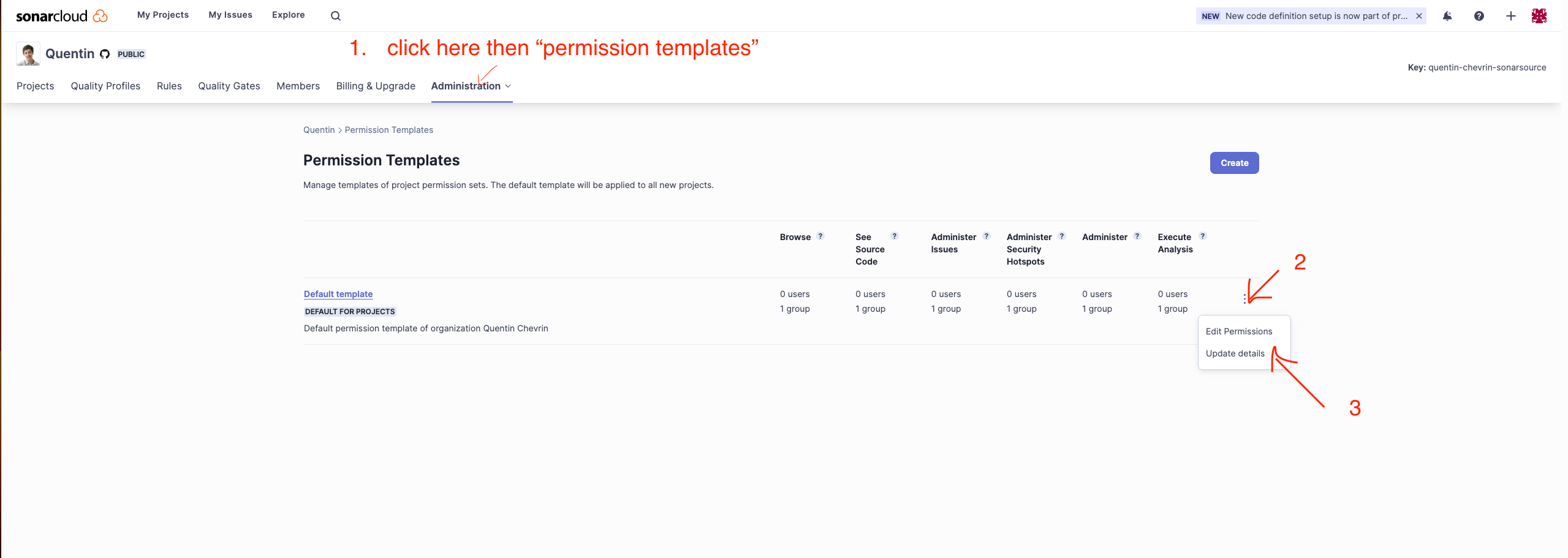
Make sure that your project key only matches one of the “project key pattern” fields of each of the permission templates.
You can check the value of that field with the following screenshot.
Yes it seems to be that. After I deleted both test permission templates, I was able to create projects fine. It would certainly have been helpful if the error message is more elaborative so users can easily identify issues like this.
Thanks Colin & Quentin!
Sam