Hi Christophe_Havard
we are using soanrcloud in CI.
I am facing the same issue of Sonarcloud/Quality Gate as waiting in Pull request. But in optional it is showing as passed. And is there anyway to make optional Quality gate as required because it is not manually set up there.
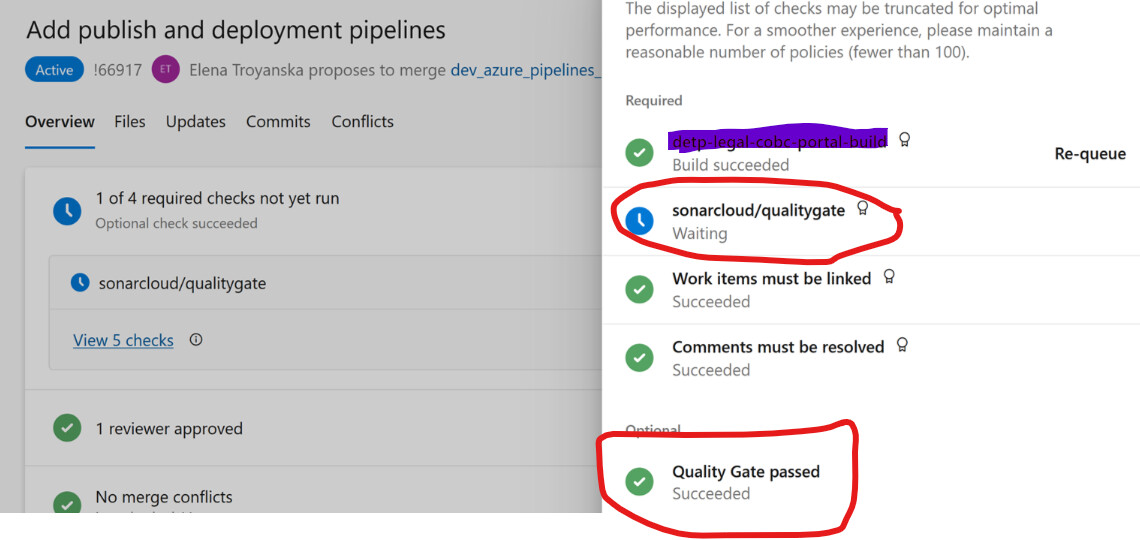
Facing exactly the same issue here.
The quality gate check & build validation pipeline is configured using this example
Hi @Ivan_Ribakov ,
Can you try this? Add these three parameters to your SonarQubePrepare or SonarCloudPrepare task:
sonar.pullrequest.vsts.instanceUrl=$(System.TeamFoundationCollectionUri)
sonar.pullrequest.vsts.project=$(System.TeamProject)
sonar.pullrequest.vsts.repository=$(Build.Repository.Name)
This may help realign any missing or incorrect parameters to prevent the issue.
Hi,
-
I am just wondering if this feature needs a ADO Service Hook configuration? Or SonarQube will consider Publish Report as a trigger and then Post PR status once Report processing is done?
-
If using enterprise edition this feature is better and if Developer version then we could set at the Pipeline task level to wait for quality gate right. But here there can be a minute wastage of resources because of wait time. Did I get this right or is there any other special intentions to use this feature?
Came up with a manual PowerShell script that fetches the quality gate status. Put it just after publish task in my Azure DevOps pipeline.
param (
[string]$projectKey,
[string]$token,
[string]$branchName
)

Write-Host "Received raw branchName: $branchName"

if ($branchName -match '^refs/heads/(.+)$') {
$branchParam = "branch=$($Matches[1])"
Write-Host "📦 Interpreted as branch: $($Matches[1])"
}
elseif ($branchName -match '^refs/pull/(\d+)/') {
$branchParam = "pullRequest=$($Matches[1])"
Write-Host "📦 Interpreted as pull request: $($Matches[1])"
}
else {
Write-Warning "⚠ Unrecognized branch format: $branchName"
$branchParam = "branch=$branchName"
}

$uri = "https://sonarcloud.io/api/qualitygates/project_status?projectKey=$projectKey&$branchParam"

Write-Host "Querying analysis for $branchName..."
$response = Invoke-RestMethod -Uri $uri -Headers @{ Authorization = "Basic $([Convert]::ToBase64String([Text.Encoding]::ASCII.GetBytes("${token}:")))" }

$status = $response.projectStatus.status

if ($status -ne "OK") {
Write-Error "❌ Quality Gate FAILED: Overall status = $status"

foreach ($condition in $response.projectStatus.conditions) {
    if ($condition.status -ne "OK") {
        Write-Error "🔴 Failed condition: $($condition.metricKey) - actual: $($condition.actualValue), threshold: $($condition.errorThreshold)"
    }
}

Write-Host "🚫 Quality Gate check failed. Failing pipeline."
exit 1

}

Write-Host "✅ Quality Gate passed."
exit 0
The pipeline task:
          - task: PowerShell@2

            displayName: "Check SonarCloud Quality Gate"

            inputs:

              filePath: ".azure-pipelines/pr-validation/scripts/check-quality-gate.ps1"

              arguments: >

                -projectKey //Your project name

                -token // Your SonarCloud token

                -branchName $(Build.SourceBranch)

              pwsh: true