Dear VS Code community,
We are thrilled to announce the release of SonarQube for IDE: Visual Studio Code v4.37 and the launch of SonarQube IDE Labs!

We know many of you are passionate about staying ahead of the curve when it comes to code quality and security. That’s why we are opening the doors to an exclusive early-access community. We want to give you the keys to our experimental features before they go live in production, and we need your help to make them great.
 What is SonarQube IDE Labs?
SonarQube IDE Labs is our new playground for innovation. By joining, you become a Sonar Insider. You get immediate access to experimental functionality directly within your IDE.
This is a true laboratory, meaning things might break, and that’s okay! It is your opportunity to test the boundaries of what SonarQube for IDE can do and help us decide which experiments graduate to full production features.

 What’s in the Lab right now?
We are kicking off the program with one major experimental feature available for you to test immediately:
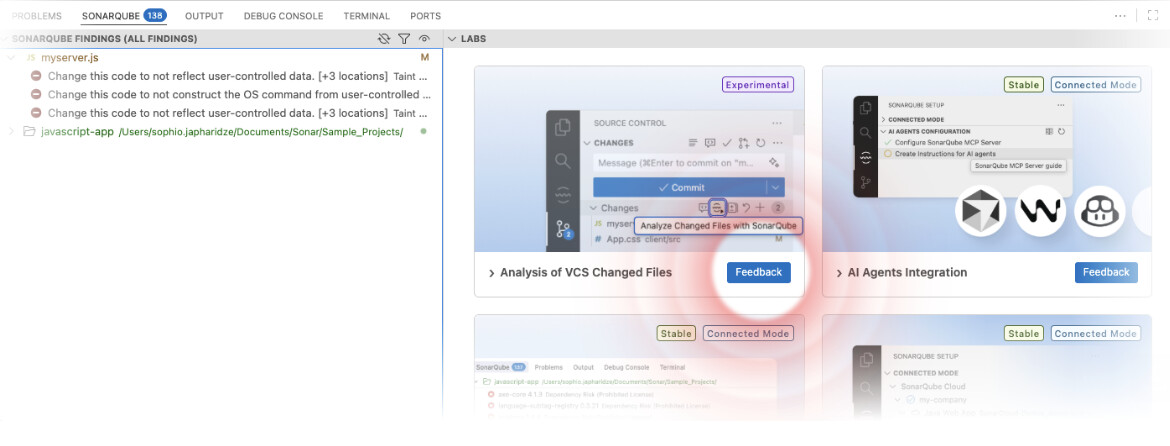
 Analysis of VCS Changed Files: This experimental capability focuses the analysis exactly on what you are working on, checking only the files you have changed in your version control system. We want to see how this impacts your performance and workflow.
 Features for Feedback
In addition to the new experiment, we are seeking targeted feedback on several key existing features. We want to know how these are working for you and how we can make them better:
- Dependency Risk Management
- AI Agents Integration
- Connected Mode
 How to Join
Getting started is simple:
- Sign Up: Enter your email in the new Labs registration form to join the program.
- Access the Labs: Once you are in, look for the new “Labs” section directly inside your VS Code settings/interface.
- Test: All the experimental features are automatically enabled for you to test.
We Need Your Feedback
This program isn’t just about early access; it’s about co-creation. Under each experimental feature in the IDE, you will see a link to a feedback form.
- Did a feature save you time?
- Did something break?
- Do you have an idea to make it better?
As always, you can check out the full, detailed release notes for all the changes.
Thanks for using our extension! If you enjoy these new features, please consider leaving a review. If you encounter any issues, let us know, here in the Community, so we can help.
Happy experimenting!
Alexander