Dear VS Code community,
We are thrilled to announce the release of SonarQube for IDE: Visual Studio v4.33!
We’re thrilled to announce a new release of the SonarQube IDE for VS Code that’s rolling out now! This update introduces a powerful new way to connect your AI assistants directly to SonarQube and includes stability and performance improvements.
Here’s what’s new:
 New: One-Click SonarQube MCP Server Installation
We are excited to introduce a one-click setup for the SonarQube MCP (Model Context Protocol) Server!
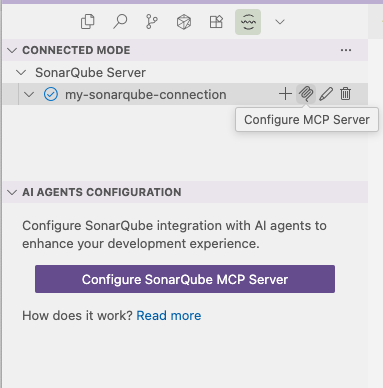
The MCP Server is a powerful bridge that connects your AI-native IDEs and assistants (like GitHub Copilot, Gemini, Claude, Cursor, and more) directly to your SonarQube instance (Server or Cloud).
What does this do for you? Instead of switching contexts, you can now use natural language in your AI chat to:
- Ask questions like, “What’s my project’s quality gate status?” or “List all new critical issues.”
- Analyze new code snippets for quality and security issues before you even commit.
This new installer automates the entire setup, so you can connect your favorite AI tools to SonarQube in seconds.
 Analysis Performance & Stability Improvements
This change leads to a more efficient analysis, improves stability, and helps prevent potential issues during initialization, giving you a faster and more performant experience within your IDE.
Get the Update!
The update is live in the Visual Studio & OpenVSX Marketplaces, as well as on our releases page in GitHub. Your extension should update automatically, but you can always check for it manually in the “Extensions” tab.
As always, you can check out the full, detailed release notes for all the changes.
Thanks for using our extension! If you enjoy these new features, please consider leaving a review. If you encounter any issues, let us know, here in the Community, so we can help.
Happy coding,
Alexander