We have an internal team working with Microsoft Fabric.
We are integrating SonarQube Cloud into the deployment pipelines managed on Azure DevOps, using the SonarQube Cloud extension for Azure and the CLI-based SonarScanner.
On Fabric we work with Jupyter Notebooks which correspond (at the code repository level) to .py (not .ipynb) and JSON files.
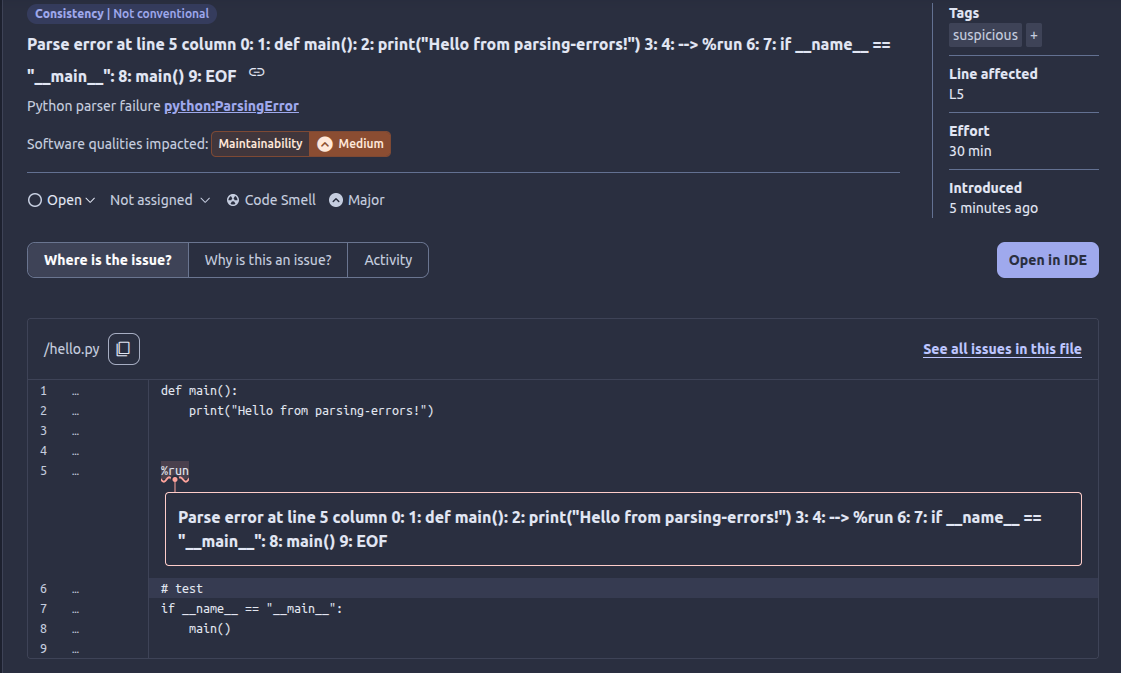
SonarScanner logs show some parsing errors on the .py files. I believe the issue is the presence of a %run instruction, which is typical of Jupyter Notebooks but is not a valid statement in standard Python.
Despite the parsing errors, the analysis is correctly submitted to SonarQube Cloud.
From the SonarQube Cloud web interface, in the Issues section, I do not see any indication of these parsing errors.
Questions:
Why doesn’t SonarQube report parsing errors (like %run) as issues?
How does SonarQube distinguish between Jupyter Notebooks and standard Python code?
Thank you in advance!
Technical details:
ALM used: Azure DevOps
CI system used: Azure DevOps
Languages: PySpark, Jupyter Notebooks, JSON
Private SonarCloud project
Scanner command used: this is the YAML pipeline relevant excerpt
I was surprised to see we don’t at least log an analysis warning in the UI when there are parsing failures. We do for some other languages. I’ll pass that along.
You can turn on the python:ParsingError to have parsing errors reported as issues of whatever severity you configure in your Quality Profile.
As for how you use Jupyter Notebooks and if our analysis is compatible with that, I’m going to ping some experts from that team.
Hi Colin, thank you so much for your reply! I believe the situation here is a bit more nuanced. The %run statements are parsing errors only if we consider the files as standard python files, but they are NOT parsing errors if we consider them Jupyter Notebooks, which they are indeed, despite the .py file extension.
Thank you in advance for the additional details and clarifications you or some experts will give me.
You are correct we do differentiate between Jupyter Notebooks and Python with the help of the file extension.
Currently when analyzing a Python .py file, if the analysis fails because of a parsing error we will not report any errors on this file (but the parsing error), still we will not fail the whole analysis (so you should get the parsing error in SonarQube Cloud).
I tried to reproduce the issue (not displaying the parsing error in SonarQube Cloud) without success. Do you still experience the missing error after the activation of the python:ParsingError rule?
I haven’t activated the python:ParsingError rule, yet. Since the .py files in my specific case are indeed Jupyter Notebooks, the %run statements are not actual parsing errors.
I was just curious about why Sonar did not display an issue for those, but now that I know there’s the inactive rule, it’s clear.
Do you think I should configure this specific Sonar project in such a way that IPython Notebooks file extension is .py instead of .ipynb? Would that resolve the parsing errors caused by the %run statements?
Sadly, it will not work as expected. The parser for notebooks is looking for a JSON file following the IPython Notebook schema. If you set the suffix for ipynb to py the analysis will currently not report any issues.
Out of curiosity how does MS Fabric uses the python file? Are they converted to .ipynb files so that you can run commands such as %run?
I know it is not the answer you were looking for, I am sorry about that.
Hi @david.kunzmann thank you for all the information you provided. I was not really looking for a specific answer, just any answer, and you did provide it: thanks. It seems to me we are in a somewhat non-standard situation here, so I’m not expecting SonarQube to already handle it, but I’d definitely like the product team to tackle the subject.
Let me dig deeper about how Fabric uses the .py files internally. I’ll get back as soon as I have an answer. Please allow me a few weeks, as we’re pausing for summer holidays.
What I would suggest is, for the details of MS Fabric and how the files are processed, you could create a new thread, it would make things a bit more clear with a clean slate.