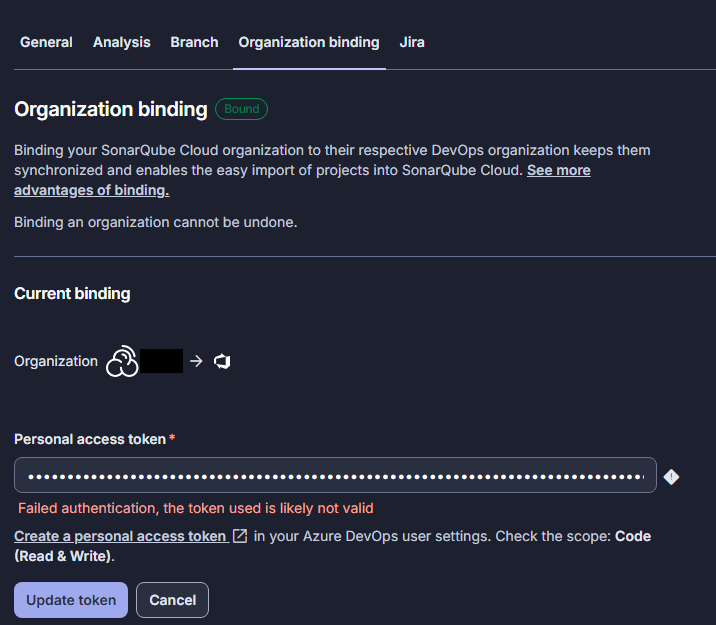
We were running SonarCloud sucesfully for a mount, but today all pull requests started to fail with the following error.
##[error]ERROR: Error during SonarScanner execution
ERROR: Could not find the pullrequest with key '1234'
ERROR: Error during SonarScanner execution
ERROR: Could not find the pullrequest with key '1234'
##[error]ERROR: Caused by: Error 404 on https://sonarcloud.io/api/alm_integration/show_pullrequest?project=Company_Project&pullrequestKey=1234 : {"errors":[{"msg":"You don\u0027t have permission, or the provided pullrequest with key \u00271234\u0027 doesn\u0027t exist."}]}
ERROR:
ERROR: Caused by: Error 404 on https://sonarcloud.io/api/alm_integration/show_pullrequest?project=Company_Project&pullrequestKey=1234 : {"errors":[{"msg":"You don\u0027t have permission, or the provided pullrequest with key \u00271234\u0027 doesn\u0027t exist."}]}
ERROR:
INFO: ------------------------------------------------------------------------
##[error]The SonarScanner did not complete successfully
The SonarScanner did not complete successfully
##[error]07:37:49.469  Post-processing failed. Exit code: 1
07:37:49.469  Post-processing failed. Exit code: 1

##[error][ERROR] SonarQube Cloud: Error while executing task Analyze: The process 'C:\agent\_work\_tasks\SonarCloudPrepare_14d9cde6-c1da-4d55-aa01-2965cd301255\3.4.3\classic-sonar-scanner-msbuild\SonarScanner.MSBuild.exe' failed with exit code 1
##[error]The process 'C:\agent\_work\_tasks\SonarCloudPrepare_14d9cde6-c1da-4d55-aa01-2965cd301255\3.4.3\classic-sonar-scanner-msbuild\SonarScanner.MSBuild.exe' failed with exit code 1
Finishing: SonarCloudAnalyze
I thaught the error is caused by the expiration of the acces token, so I created a new one
Many systems will return a 404 error (i.e. what you’ve asked for doesn’t exist) rather than a 403 error, thus admitting that the resource exists but you just don’t have access to it.
You should double-check the PAT you’ve configured SonarQube Cloud with. Note that there are two possible places for this: at the global level and at the project level.
I copied the Azure generated token directly to Sonarcloud Administration / General Settings / sonar.pullrequest.vsts.token.secured but the error persists. I assume this is the “project level token“
I tried to navigate the failing url in the browser. It fals with the same 404 error. Than I entered the pull request key of a branch existing in Sonar and failed with the same error.
Note that the failing url is the one pointing on SonarCloud. I wander why the SonarCloudPrepare@3 works, but SonarCloudAnalyze@3 failes because cannot reach an URL, pointing on SonarCloud.
As SonarCloud does build/analysis optimization, I would expect, the connection from Azure to SonarCloud has been established before than SonarCloudAnalyze@3 (to get what needs to be anylyzed)
I would also expect SonarCloudAnalyze@3 to generate an URL that can be reached, or?
Can you please tell me if I missed something. Ar the location of “at the global level and at the project level PAT“ what yo meant?
The analysis / scanner log is what’s output from the analysis command. Hopefully, the log you provide - redacted as necessary - will include that command as well.
@PeterBa it really doesn’t matter what your PAT expiration date is; Azure requires that the user log in every 30 days or it kills the PAT regardless of the expiration. Since you’re currently experiencing something different than the OP, can you create a new thread with all your details, please?
So we have a manually-configured PR, and then a 404 on retrieving that PR. So either it’s a permissions error, as I advised above, or you should drop your manual PR configuration and let analysis pick it up automatically from the environment.
thank you for the feedback, I double checked the PAT and indeed, it was expired.
As an additional info, I want to say, that I was a little becaus there are different places to set the PAT (in projects and in organization). For the comunity I list below the link to these places: